A portal under your name for every client
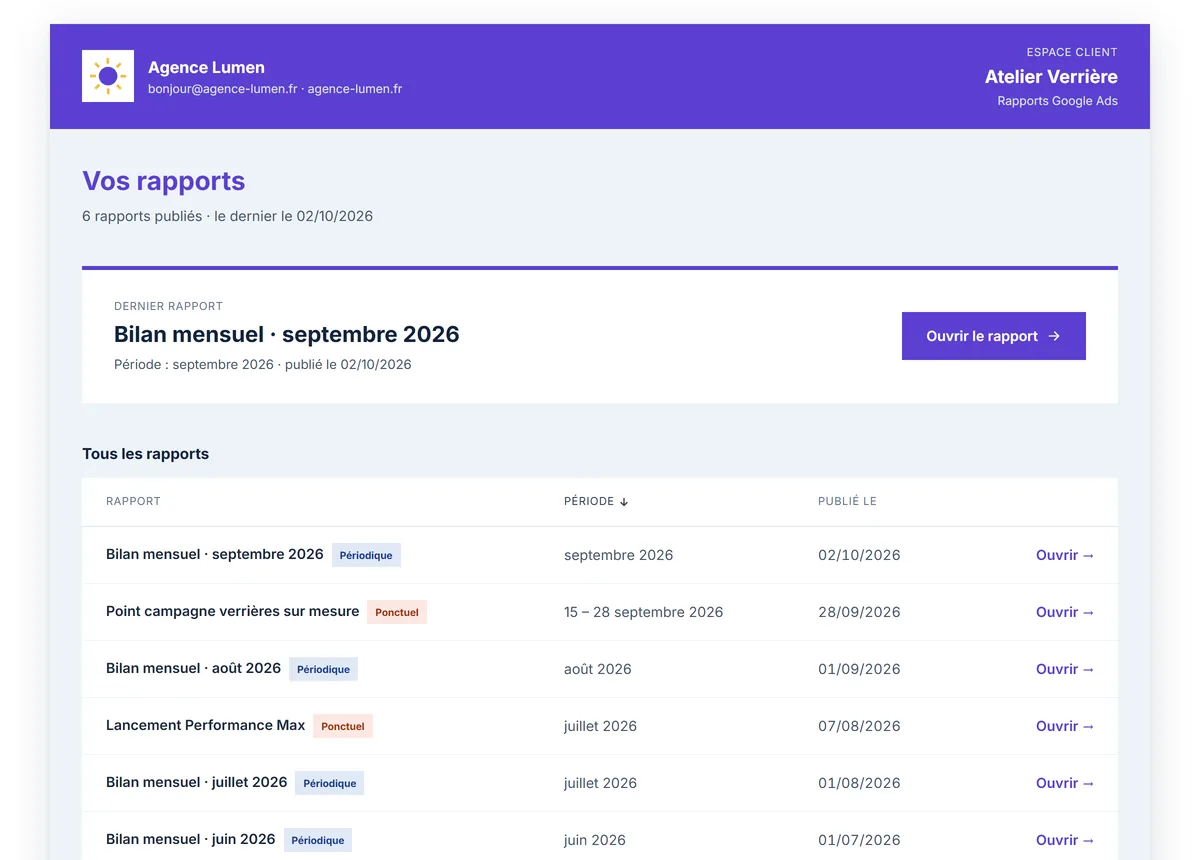
Your client no longer digs through emails for reports: they find them all, one-off and scheduled, at a single address under your agency's name that they bookmark.
What the portal gives you
- An address for your agency. your-agency.acvhub.net: you choose the name, and the portal is served there with no mention of Ads Clear View.
- A readable address per client. Each client gets a short, hard-to-guess address; you can replace it with /c/client-name, easier to share, which is then protected by a code.
- An access code. The portal can ask for a code, required with a readable address; regenerating it cuts off anyone who had the old one.
- In your colours. Your agency's logo, colours and contact details, alongside the client's logo.
- Every report in one place. One-off and scheduled reports together, in the language chosen for that client (French, English or Spanish).
How it works
Choose your agency name
Once and for all: it gives the address your-agency.acvhub.net.
Set up the client's portal
Readable address, access code, language: everything is set on the client's page.
Send them the link
They bookmark it; each new published report appears there.
Which plans include it
- Free
Not included
- Solo
Included
- Pro
Included
- Agency
Included
Compare every plan line by line
Frequently asked questions
Does my client need to create an account?
No: no account and no password. The portal address, and its code if enabled, are enough.
Does my client see Ads Clear View?
Not on your agency's address: no logo, no name, no link to Ads Clear View.
Can access be cut off?
Yes: renewing the address or the code cuts off anyone who had the old one, and a client's portal can be closed.
Other features
Connect a Google Ads account and ask your first question
Free plan, no credit card, no time limit. Read-only access: nothing is ever changed in your accounts.